Getting Started with Ferrum Anvil
Install the published v0.1.1 unsigned preview, or build from its release tag. The source commands below follow the tagged Anvil README.
SHA256SUMS. macOS installers are not Developer ID signed or notarized and Windows installers have no code-signing certificate. In-app updates use verified minisign signatures; this does not code-sign the installers. See the preview downloads and Anvil overview.Downloads or Source Requirements
Use the preview installers or CLI archives for your platform. Rust and Node.js are needed only when building from source.
- Rust (stable; the repository's
rust-toolchain.tomlselects it) - Node.js 22 or newer
- On Linux, the WebKitGTK libraries that Tauri needs. Windows uses WebView2 and macOS uses WKWebView.
- For source builds, clone the repository and check out
anvil-v0.1.1. Run commands from that root. For packaged builds, use the preview downloads.
Build and Run
The engine, the anvil CLI and the lab build as one Cargo workspace. The desktop app runs in Tauri's development mode.
cargo build --workspace                        # engine, CLI, lab
cargo test --workspace --exclude anvil-desktop
cd apps/desktop && npm ci && npx tauri dev     # desktop app (development)
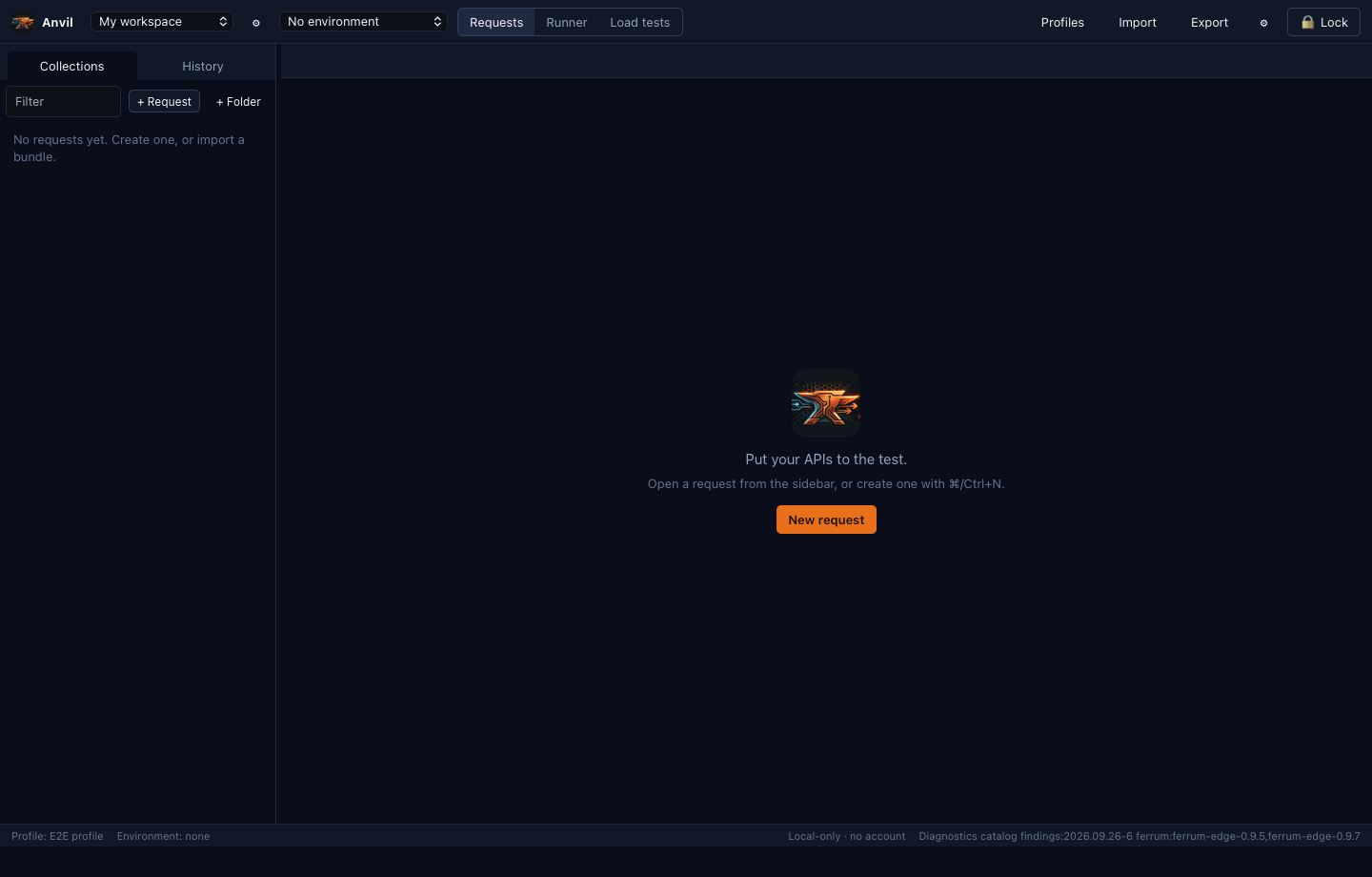
On first launch there is no account or sign-up. Choose Start now — no password to keep the data key in the OS keychain and go straight to the workbench, or Protect with a passphrase and save the recovery key Anvil shows once. No account is needed and nothing is synced. The workbench then opens empty:
CLI Quick Start
The anvil command-line client uses the same engine and local store as the desktop app.
anvil profile create me          # passphrase from --passphrase-stdin or ANVIL_PASSPHRASE
anvil workspace create Demo
anvil add Demo "Health" --url https://example.com/health
anvil send Health --workspace Demo
anvil import-spec Demo openapi.yaml     # OpenAPI/WSDL/Postman/Insomnia/cURL/HAR
anvil run Demo --folder Smoke --junit report.xml
Data lives in the platform's application-data directory under Ferrum Anvil. Set ANVIL_DATA_DIR, or pass --data-dir to the CLI, to use another location.
Run the Real-Gateway Lab
The lab runs a checksum-pinned Ferrum Edge release binary on loopback with controllable test servers, and checks what Anvil concludes from each failure. The default pin is Ferrum Edge 0.9.8; earlier supported releases 0.9.7 and 0.9.5 use an explicit --release, as shown below for 0.9.5.
lab/scripts/fetch-gateway.sh              # download + verify the pinned binary
cargo run -p anvil-lab -- list            # profiles
cargo run -p anvil-lab -- run all --untrusted-pass
cargo run -p anvil-lab -- up core         # keep the core lab up for manual testing
lab/scripts/fetch-gateway.sh v0.9.5       # an earlier supported release …
cargo run -p anvil-lab -- --release v0.9.5 run all --untrusted-pass # … and its run- The lab has 14 profiles:
core,policy,admission,drain,tls,auth,streams,cpdp,h3x,mesh,proxyproto,workload(the SPIFFE Workload API),early(0-RTT early data) andmcp(MCP tool routing).run allruns every one;run <profile>runs one, andup <profile>keeps one up for manual testing. fetch-gateway.shuses an authenticated GitHub CLI (gh) and refuses a binary whose checksum does not match the release's lock file.- The lab uses fixed loopback ports. Stop any other lab first, and raise the open-file limit (
ulimit -n 4096) before a full run. - The
workloadprofile needs Unix domain sockets (macOS or Linux). When the checkout's path is too long for Ferrum Edge's socket rules, or a parent directory is group-writable, it puts its sockets in a private temporary directory instead and records why. - With
up corerunning, the lab gateway listens on127.0.0.1:18080. Declare it as a Ferrum gateway profile in Anvil, naming the release the lab runs (0.9.8 unless you passed--release), to see gateway findings in the desktop app.
What Is Not There Yet
- Published preview installers lack platform code signing. In-app updates are opt-in and signature-verified; DEB/RPM packages need manual updates.
- The release publishes native Linux x86_64, Windows x86_64 and macOS x86_64/ARM64 checks. Consult release-evidence.json for their scope; this guide does not certify your OS.
- Social sign-in providers are unavailable until they are registered. They are never needed to unlock Anvil.